
An example of software built with AI
AuroVolt: the software for electricians, built with AI
Place the electrical points on the floor plan and get the bill of materials and the quote, with no CAD skills needed. We built it with artificial intelligence: it is an example of what we can create, tailored to your company or your trade.
Built with AI, customisable to your needs
AuroVolt was born from a real need of a trade and we built it with artificial intelligence. It shows what a company or a craftsperson can have today: software made for their own work, not a generic program to adapt.
Built with AI
AI-assisted development makes it possible to go from an idea to a working application in less time and at lower cost than a traditional software project.
Tailored to your work
We can adapt and customise the software to your needs: your price lists, your calculation rules, your documents, the way you work with customers.
For companies and craftspeople
The same approach applies to other trades and other processes: if you have a repetitive task or an idea for a tool that does not exist, we can assess it together.
What AuroVolt does
AuroVolt is made for people who work on electrical installations and want to meet the customer with a clear proposal, without learning a drawing program. It is built around the Italian CEI 64-8 standard.
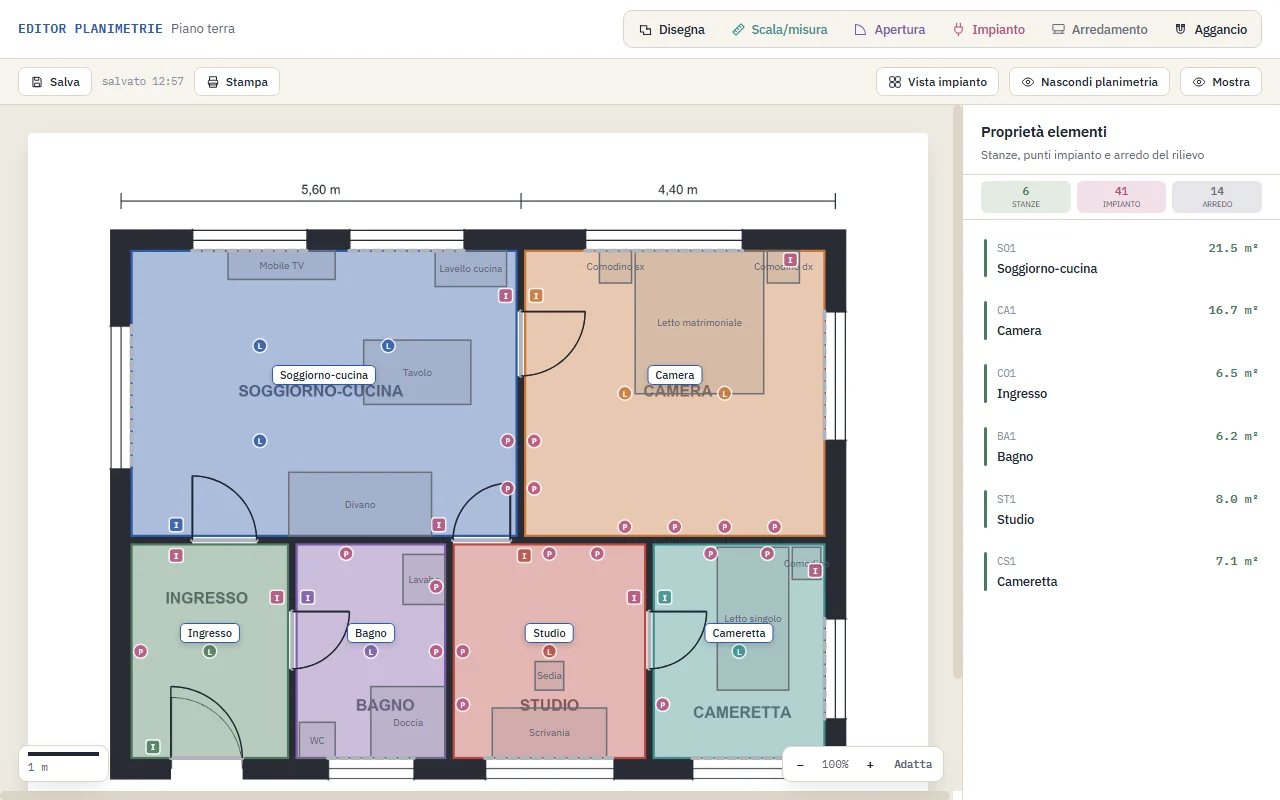
Electrical points on the floor plan
Upload the floor plan (PDF, DXF, PNG or JPG), set the scale by measuring a known dimension, mark rooms, doors and windows, and place the electrical points with the mouse.
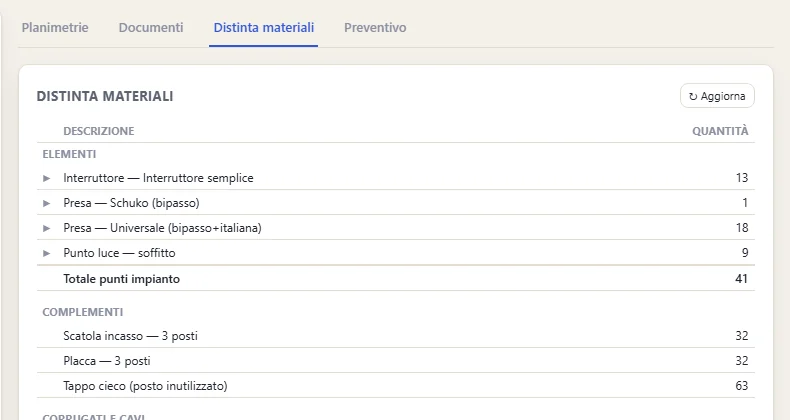
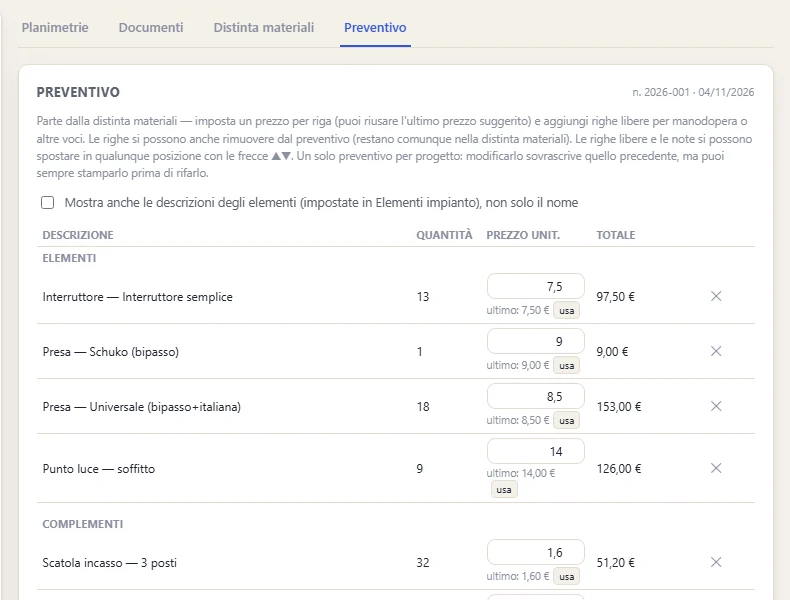
Bill of materials and quote
From the electrical points you get the list of materials to order and the quote, ready to print or export to Excel.
Show it to the customer, edit it together
Show the floor plan to the customer, also in the installation view with symbols, and move, add or remove points on the spot. It can also be printed.
CEI 64-8 suggestions
Choose the installation level (basic, standard or home automation) and AuroVolt proposes the minimum electrical points for each room. It is a design aid: the final check remains the professional's responsibility.
How it works
Four steps, from the floor plan file to the document you hand over.
- Upload the floor planPDF, DXF or image, and set the scale.
- Mark the roomsRooms, doors and windows, in a few clicks.
- Place the electrical pointsBy hand or starting from the CEI 64-8 suggestions.
- Print or exportFloor plan, bill of materials and quote.
Bill of materials and quote
The work on the floor plan immediately becomes a list of materials and a tidy quote.
Frequently asked questions
Was AuroVolt really built with AI?
Yes. AuroVolt was built with artificial intelligence tools for software development. AI lets us reach a working product faster: it is the same method we can apply to our customers' projects.
Can I have software like this for my business?
Yes. We can customise AuroVolt or build a new tool based on the needs of your company or your trade. Contact us and tell us what you need.
How can I try AuroVolt?
The web version can be tried right away: you only need to sign up with your email from the AuroVolt app. For larger projects there is also the Windows desktop version, with a perpetual licence or an annual fee.
Do I need to know CAD?
No. You upload the floor plan, set the scale, mark rooms, doors and windows and place the electrical points with the mouse. No commands or CAD knowledge needed.
Where are my projects saved?
In the web version projects stay in your browser, not on our servers, and are not synchronised between devices. You can export them as a ZIP file and import them whenever you like. For the data processed at sign-up see the privacy policy.
Do the CEI 64-8 suggestions replace the professional's check?
No. They are a design aid: the rules can be edited in Settings and the final check remains the professional's responsibility.
Software like AuroVolt for your business?
Tell us what you would need: we assess it together and see how to build it with AI, tailored to your work. In the meantime you can try AuroVolt.